Tuesday, August 18, 2015

#OneBookJuly | Wrap Up


I decided to move back into rings (a new Gillio) for my personal planner once OBJ was over.  What OBJ has taught me is that even though I've learned that I can use a traveler's notebook as my main planner, I also know that I prefer to use rings for planning.  I prefer notebooks for note taking and journaling, and I prefer a traveler's notebook for work!  I like different types of planners for different things.

Why do I prefer rings for planning?
I love my archiving system and can't imagine being without it.  The bullet journal is OK for me if it's random lists and notes, but I definitely don't like it for planning, or for tracking.  If I want to go back and find some information (which I tend to do more than you would think), I don't want to have to sift through all the flotsam and jetsam of the note pages, I just want to flip to the date and find it.
I also love the flexibility to add and remove pages and sections as I need, it allows me to switch things up without changing the whole system.

What do I prefer to use notebooks for?
Notes that are taken in chronological order (in other words I don't have to go back and add more notes later - for example - daily notes, meeting notes, notes from a doctor's appointment), or one subject per notebook, tracking things like expenses, random lists and jots.

My goals for OBJ were to see if I could stick to one planner for a month, determine if I could use a traveler's notebook as my main planner, and see if I could use a bullet journal.  The answer to all three is YES I can!  I realize that I have a solid system and can use any planner I choose, as long as the system remains the same.

Friday, July 17, 2015

#OneBookJuly | Week 2


This week I'm finally settling in to my new system!  I am so happy with my DIYFish weekly chart, that's something I've learned that I don't want to live without. 

I asked KiddyQualia (on etsy) to make me a personal size booklet with week on one page plus notes and I received it in the mail this week (she is going to start selling them in her shop). The books are fantastic - they have a clean, simple design and fantastic quality - the paper is so smooth.  I should mention that I'm in no way affiliated with her, I just love her products!  I haven't added the book in yet because I've got to transfer all of my data over - so I'll probably wait until August.


I even started my project in my bullet journal, like I mentioned last week, and surprisingly it didn't drive me crazy to have everything mixed in together.  I just left a few pages for additional notes, and then started back up on my daily pages.

Speaking of daily pages, I really miss having a dedicated day on one page.  I feel like I need them for really busy days.  Actually, I feel like I need them for days when I need to get a lot done, so I have to schedule out what I'm doing when.  I find without some structure, I tend to sit on the couch and binge watch TV!  Downton Abbey on Amazon Prime?  Yes please! So instead of adding in a day on one page, I just created one in my bullet journal.  I kind of like it!

Next week will be an interesting test of the system, as I'll be on business travel the whole week.

Thanks for reading!

Find me on Instagram @PrettyLittlePocket

My YouTube Channel:  PrettyLittlePocket

Thursday, July 9, 2015

OneBookJuly2015 | Week 1


I'm back to give an update on how #OneBookJuly2015 is going! Take a look at last week's blog to take a peek at my setup, if you missed it.

I had an aha moment this week. I realized that the reason I have such a hard time with a travelers notebook, is lists and projects.  Really anything that requires me to add more information at a later time.  I don't like having it spread out in the notebook.  I want to have the  full list/project grouped together and add more pages if I need.

I like using a notebook for anything that I can write out and then move on to another subject without having to worry about adding more information to it later - like journaling, daily tasks lists, daily notes, etc.  

I have a project I have to get started on, but I find myself not wanting to start it in the travelers notebook.

So to use a travelers notebook as my main planner, I need to see if I can get over my preferred way of organizing lists and projects and live with things spread out in random chaos ;), which is why I'll be starting my project in my bullet journal this week.

Are you participating in OBJ?  If so, how's it going?

Thanks for reading!


Find me on Instagram @PrettyLittlePocket

Check out my YouTube Channel:  PrettyLittlePocket


Wednesday, July 1, 2015

OneBookJuly2015 | My Set Up


I'm so excited to take on the #OneBookJuly2015 challenge - I really need it this year!  As of late I've been on the planner merry-go-round, and getting tired of it.  My focus for this challenge will be to stick to one planner for the entire month, to quit flipping back and forth between the various styles of planners.  I really want to know if I can use a traveler's notebook for my main planner.  I'm also going to see if I can track my diabetes management in this book as well.  I've tried several times to incorporate this into my planner, but I've failed each time.  There's a lot of information that I need to track and having everything in one book would be ideal.

What I'm not changing for this challenge is my work planner set up.  That is completely separate and needs to stay that way for privacy reasons.  I'm also going to stick to journaling in a separate notebook.  I've done that for over 30 years and I don't want to change it now.  Finally, I'm going to keep my photo journal/smashbook/art journal (I can't figure out what to call it) separate as well since that system works for me too.

So I may not be following the rules exactly, but I still think the challenge will give me some valuable insight.

So on to the set up... since I know that's what you really came here to see ;)

I'll be using my creme brûlée personal size traveler's notebook from ChicSparrow.  This notebook has four elastic bands.

The first elastic houses my cover page, a zip pocket envelope with my personal/emergency info card, some sticky page flags, loose notepaper, stamps, sticky notes etc.  the zip pocket is wrapped around a notebook which holds all of my more permanent reference lists and information.


The second elastic contains a folder with frequently used stickers, and some papers from my Filofax that I haven't completely transferred over yet.  This folder surrounds my calendar.  I stitched together a book that uses an undated week on one page + notes (from PembrokePapers on Etsy) with my DIYFish weekly chart tipped in.


The third elastic houses my bullet journal, which is a Midori grid notebook cut down to the personal size.  I'm new to bullet journaling, but thought this would be a great time to start using one.  I can put in daily notes and anything relevant to my health and diabetes management.  So we'll see how this goes!


The last elastic is for my tracking section.  I have a yearly chart (from DIYFish) that I use to track workouts, medical things, travel, paid time off from work, and products that I want to track to see how often I'm ordering.


For a closer look at my set up, be sure to check out my (very first) YouTube video!

Happy Planning!  I can't wait to see what everyone else does with this challenge this year.  I'm hoping to see lots of new planner posts,  pictures, and videos :).

Friday, January 2, 2015

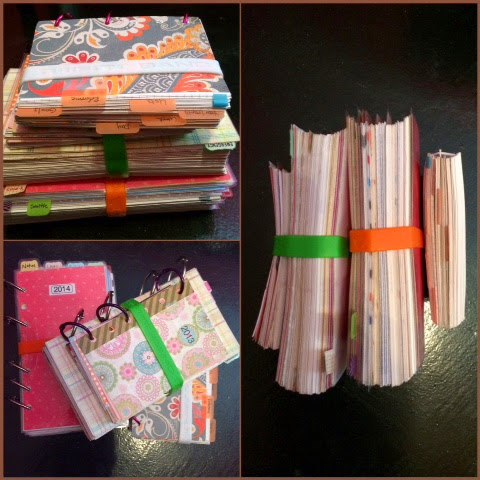
Archiving Planner Pages

It's that time of year again when a lot of us are starting a new planner, and if you use a ring-bound planner system, it can be a challenge to figure out what to do with the old pages.  Personally, I like to keep mine.   Not only do they serve as a record of my life, I like to leaf through them every once in a while, and sometimes I need to refer back to something in an old planner.   Here's how I manage to archive my pages:


Storing the Pages
Since starting with Filofax in 2012, I've been creating an archive book using binder rings.  I create new dividers that mirror whatever sections I had in my planner that year and add the pages to the appropriate section. It makes it easy to flip through them, while still keeping everything together. Plus it's fun to see all of your pages and memorabilia together in one chunky book at the end of the year.

Referring back
I keep a running list of important dates throughout the year, and I also keep a contents page of all of my notes.  Then at the end of the year, I type this into Evernote.  This makes it easy to search for a note or important event later if I need to.  If it's something I know I'll refer to often, I'll either type up the note, or take a picture of it and store it in Evernote.

Do you archive your planner pages?  If so I'd love to hear about your archive system!


Friday, July 25, 2014

Filofax Flex Setup for Work


I can't believe I've been using my flex for work with the same setup for about five months!  The system is working really well for me, but I'm getting antsy to change my setup.  So I decided I would share my current setup first.


I'm using the Filofax A5 Leather Flex Lizard Print in the color blackcurrant.  When the binder is closed I wrap a Martha Stewart fabric elastic band around it.  I've traveled with it this way several times  and it keeps everything nice and secure.


I have three notebooks in the Flex...


  • Franklin Covey Compass Weekly Classic - This is 8.5" x 5.5", so I had to trim the back cover slightly for it to fit in the flex.  I need to be able to report my time, by project, each week.  So I track my time throughout the day, then highlight time spent on each project with a different color.  It makes it very easy to report hours at the end of each week.  It also has a month on two page calendar where I track business travel, deadlines, project deployments, and paid time off. There is a monthly task list where I track accomplishments for the month.
  • I use an A5 notebook for random jots and to take notes during meetings.  I use lots of sticky flags to mark projects or important notes.  After I finish a notebook, I archive the pages in a Staples mini binder.   That way I can always go back and find any notes, if I need to, without having a ton of notebooks hanging around.  I go through a notebook about every 2-3 months. Important meetings and notes get typed up and stored electronically.
  • Lastly I'm using a Filofax Flex A5 Thin Ruled Notebook to track my To Dos. It's a very similar system to what I wrote about here


I also have a Flex pen loop that holds my new favorite pen, the Pentel EnerGel Pearl Needle Tip (0.5) with black liquid gel ink.


Thanks for Reading,
Tonya

Follow me on Bloglovin'
Follow me on Instagram


Thursday, January 9, 2014

Planner Update

I decided to delete my blog because I was just so busy with work and travel and such that I wasn't posting very regularly.  Then I felt like blogging again, and was sad that I didn't have a place to post.  So I have decided to restore the blog and just blog whenever I feel like it without feeling pressure to post on a regular schedule, so it could be an erratic posting schedule. I hope you're OK with that!


So what I been up to, planner-wise?

For 2014 I decided to stick with the personal size.  I am pretty much using the same setup with a few tweaks.  I've added a projects section, removed the diabetes tracking sheets (I'm doing that outside of the Filofax now) and adding a monthly goals sheet.  I am currently using an aqua malden, but will soon be moving into a medium Gillio Compagna Croco in shiny Coral.  It is on it's way to me now from Belgium!

For work I am using an A5 Filofax Osterley in Grey.  I had a crazy number of sections in this filo to begin with but after using for several months, I whittled it down to just what I need.  Along with the Filofax, I use a simple spiral notebook for taking meeting notes.  I found that I didn't like taking notes in a ring binder.

My collection has changed some too.  As you will see, most of my Filofaxes are not in use.  I like to be able to switch around my main Filofax when I feel like it.  I need to sell off all of my pocket Filofaxes, but I just can't bring myself to do it!


  • A5 Ochre Malden - Not in use but will be my Reference/Household binder once I get it set up
  • A5 Grey Osterley - Work Filofax
  • A5 Crimson Lizard Print Flex - Not in use (yet) - I need to find an excuse to use this, let me know if you have any good ideas.
  • Personal Aqua Malden - Personal Filofax
  • Personal Orange Osterley - Not in use
  • Personal Plum Osterley - Not in use
  • Personal Deep Pink Domino - Not in use
  • Pocket Raspberry Chameleon - Not in use
  • Pocket Red Amazona - Not in use
  • Pocket Deep Pink Domino - Not in use
  • Pocket Orange Domino - Not in use
  • Pocket Plum Osterley - Not in use
  • Pocket Blackcurrant Lizard Print Flex - Gym Filo
I also have a few Franklin Covey binders too...
  • Compact Black Leather - I don't know the style - Not in use, going to sell
  • Compact Burgundy Aurora - Storage Binder
  • Classic Black Her Point of View - Not in use
  • Classic Red Her Point of View wire bound cover - not in use
Yes, I think I have a slight planner addiction!

Friday, November 1, 2013

Section by Section - Health & Fitness

I added a Health & Fitness section into my personal planner back in August.  I used it faithfully until I hit Total Planner Chaos.  Now I am back to using it again, and it really does help me keep on top of things (I back filled all the information I skipped entering during my hiatus).  Since November is American Diabetes Month, I am going to show you specifically how I use my planner to manage my diabetes.  I know this won't apply to most of my readers, but I think the same process can be used to track other conditions or health information.  So here we go...


Health & Fitness Section
Medical List - This is a dated list of each medical appointment I have and the purpose of the appointment, or anything significant related to Medical (such as when I started taking a new medication)  This serves two purposes, first, it helps me at tax time to calculate my medical mileage and to make sure I have the necessary receipts.  Second, it is very helpful when talking to medical staff to quickly be able to give them information they need, such as last flu shot, or when I was diagnosed with something or started taking a medication.  This list gets archived into my medical binder at the end of each year.  I am also going to start capturing this information in Evernote so I can have access to previous years information on the go.


Medication List - I use a Filofax Cotton Cream To Do list Sheet, since it has double spacing.  For each medication I track the pharmacy, prescription number, medication name, dose, and when the prescription expires.  Sometimes I also include how many refills I have left.  I only list out medications that I take on a regular basis.

Vitamins List - I use a Filofax Cotton Cream To Do list sheet for this as well. I list the name and dose of any over-the-counter vitamins I take on a regular basis.

Medical Notes - I use Filofax white ruled note paper because it is thin (so I can keep a lot of it in my binder) and cheaper than cotton cream or colored paper.  This is just a running notebook of medical information.  If go to a doctor visit, I keep notes at the appointment, or I enter notes as soon after as I can.  I put the title (usually the doctor/company name), date, day of the week.  I also track any medically related phone calls and who I spoke to.  The notes mainly consist of what we talked about, any changes to my care, any procedures they did, and any specific medical condition or diagnosis information they give me.  Since it is a running notebook, my current page is marked with a custom fly-leaf I made with slotted holes so I can move it when needed without opening the rings.  It has a side tab so I can quickly get to the right page.  I also have a Leuchtturm pen loop attached to the fly leaf.  These pages get archived to my medical binder.


Diabetes , Fitness, and General Health Tracking (My Logbook) - I use bright quadrille paper from KiddyQualia. The paper is so bright and fun, and is thick enough to handle darker ink gel pens.  I have one page per day and track blood sugar readings, if the reading is 'off' then I highlight it and try to figure out why and write notes about that.  I include how I am feeling (stressed?  Headache?), nutrition information that may affect my diabetes, If I changed settings on my insulin pump (like suspending or temporary basal rate).  This page is also where I track exercise (since it has a large impact on my blood sugars), water and Diet Pepsi intake (I'm trying to quit this habit), and what day of the Infusion Set and Glucose Sensor I am on.  These pages get archived to my medical binder.

I have been tracking weight and my measurements and detailed nutrition information in a bound notebook, but I may end up moving them to this section as well.  Another idea is to record workout sessions, specific sets and reps, weights, etc.


Reports - This is specifically related to diabetes.  I upload all of my blood sugar and sensor readings online so that my doctors can access it.  I run reports, and then I shrink them to fit into Filofax Personal paper.  I print them out weekly (on Filofax Cotton Cream Paper) and then analyze the reports and write notes.  This helps me to spot patterns for when blood sugar readings are off.  I write notes on the back of the report and come up with ideas of what I want to focus on for the next week.  The reports are tiny but I can still read everything.  This is one of the main reasons I'm considering moving up to A5.

I am very pleased with how this section has kept me focused on my health, and has come in handy for taking with me to doctor appointments!

Other Sections (related to Health and Fitness)
Emergency Information Sheet - Name, contact info, medical conditions, emergency contacts, PCP, Allergies, Blood Type

Weekly Calendar - (Filofax Week Per Page + Notes)
I track days I have to do a set change or sensor change.  Since this isn't on set days of the week, it is hard to keep track.  So I use a Martha Stewart Dew Drop to indicate the next time I need to do a set change, and another one for sensor changes.  Once I have done the change, I put a little MarkIt Dot next to the date (Orange = Set Change, Green = Sensor Change), and  move the dew drop.

I also put my Fitness goals on the Notes page and tick off the boxes as I complete them.  If I miss them, I circle the box in red.  I also put MarkIt Dots next to the dates/times (Purple = Cardio, Blue = Strength Training)

I highlight any medical related appointments in pink and put Pd. next to them if I have paid my copay.

I write down when the next order of my medications need to be refilled

Info Section (I Use Day Runner A-Z tabs).  This holds doctor, pharmacy, and insurance company contact information, as well as my online account information for each of these places (user name and passwords are coded, not actual)

Whew, that was a long post. Thanks for reading!

~Tonya

Follow me on Bloglovin'
Find me on Instagram

Friday, October 25, 2013

Total Planner Chaos


It's amazing how a small little detail, like not being able to carry your planner with you everywhere, can throw you into total planner chaos.  I know because this has just happened to me.  It all started when I decided to carry a smaller purse.  I can get my personal sized planner in there, but not without difficulty.  Soon, I just stopped carrying it with me.  That meant I couldn't write in appointments while I was out, I had to get the appointment card and write it in my planner later.  This led to forgetting appointments and double-booking.  I couldn't jot down notes, or things that I wanted to remember later. Sure, I had my iPhone with me, and that was my plan - I would use the phone and just sync up with my planner, but I'm a paper sort of girl, and didn't ever really like typing into the phone.  So that just didn't work.

Not having everything in my planner, made me stop trusting it, and then I stopped using it.  I stopped writing appointments and to-dos, I stopped tracking my health and fitness activities.  Everything.

It's probably been a month or two, and now my life just feels like a mess, and it's stressful.  I need to get it together.  First thing I'm going to do is make sure I have a purse that will easily fit my planner!  I'm going to make sure I go back to daily planning.  I've seen the dark side of total planner chaos and it's not fun!

Have you ever had something like this happen to you?  How did you bounce back from it?

~Tonya

Follow me on Bloglovin'
Find me on Instagram

Thursday, October 17, 2013

Section by Section - Tackling the To Do List

I thought it would be fun to take a look at my planner(s) section by section.  Since I was asked (quite a while ago - sorry) to do a post on how I manage my to do list, I thought I would start with my to do list section first.

I actually manage my to do lists differently for work versus personal.  This is because I have a lot more tasks for work than I do for personal, and it requires a lot more structure.  So this post will focus on work task management.

I have a section in my planner specifically for my to do list. I use the JEN action planner notebook pages and cut and punch to fit the A5 planner.  I like these pages specifically because each page is numbered, as well as each item on the list.  So if I want to refer to a task, I can do it by number (e.g. Page 4, line 3 I use Page:Line naming convention on the list). It also has a column next to the task where I can put a date completed.  I can quickly glance at a page and know which items are outstanding.

When I process meeting notes, any action items get transferred to my to do list. If I'm on a call, any action item goes on the to do list.  If I get an email, I move it to my @action folder in Outlook and add the task to my to do list.  Of course, if there is something I can take care of right away, I do it instead of writing it down.  The to do list is for tasks that I can't get to or complete immediately.

I don't usually schedule specific to do's for a specific time, I just block out chunks of time on my calendar to work on my to do list.  Then I scan through my list, pick the task that I need to work on, and start working.  When the task is complete, I put a checkmark through the number and write the complete date next to the task.

Here's a sample page and some of the conventions I use:


If I need to delegate a task, I circle the initial(s) of the person it has been delegated to.  Once the task is completed, I check off the number and write in the date completed.  If the task has a specific tracking number associated with it. I write down the number and highlight it with a Frixion highlighter.  Once the item is complete, I erase the highlight.  This makes it easy to see which ones are outstanding.

If I need to delete a task, I X out the number and draw a link through the column where I normally put the date.

If I need to postpone the task or move it to my 'someday/maybe' list, I draw an arrow through the whole number and column where I normally put the date.

Once a page of tasks is complete, I put the date I finished the page under the start date and draw a line through the page.  Usually I paperclip the completed pages together, and the paperclip also acts as a bookmark to mark my spot in the to do section.

Please let me know in the comments if you have any questions or want more info on my process.

~Tonya

Tuesday, October 15, 2013

Mulling Over My 2014 Setup Options

I can't decide what I want to do for my setup for 2014 - the problem is I have way too many awesome binders that I want to use!  I've purchased a few more since my last collection post.


I have an A5 Ochre Malden - I was using this as my work binder, but switched to an A5 Osterley in Grey.  I thought the Osterley had a more polished professional look than the Malden.  I think the Malden is rugged and timeless, perfect for to hold all of my reference information.  So that one just needs to be set up.  


I have a new (to me) Franklin Covey classic binder.  I think it is the Her Point of View binder in black from around 2007.  It is full grain leather, the most buttery soft leather I have ever felt, seriously.  I want to use this for everything.  I bought it for work because I live in the US and it is so hard to find A5 paper and binders - especially with Filofax hole spacing (and I'm way too Type A to re-punch if I can see the 'wrong' holes)!  So I have all my meeting notes in the A5 and I don't have a good way to archive them.  I don't really want to spend at least $50 on an A5 binder to use just to store old meeting notes.  I do reference my old notes occasionally, so I like to keep them and be able to leaf through them.  Anyway, the FC classic size fits 5.5 x 8.5" paper and has common hole spacing to other US binders and planners - and has 1.25" rings!

Here's what I'm contemplating for 2014 setup:
  1. Moving from my personal size up to A5 size, and using the grey Osterley as my personal binder.  Using the FC classic as my work binder.  This would be costly, since I have all of my 2014 calendars, papers, etc. for the personal size and I'd have to re-buy for the A5.  I like the idea because I would be able to fit more pages into my binder.  I work from home, so I don't really have to lug around my planner too often.
  2. Move into the FC Classic for personal and work - can I be a one life one planner kind of girl?  This leaves me without using a Filo as my main planner,  and I love my Filofaxes (Filofaxi?)
  3. Stay in the personal size for my main personal Filo, and move to FC classic for work.
  4. Scrap the whole idea of moving - stay in the personal size for main personal Filo, and stay in A5 Osterley in Grey for work.  If so, I need to find a use for my FC classic - it's just to amazing to sit around unused.

So what do you think I should do?  Please let me know in the comments, your input is greatly appreciated!

~ Tonya

Follow me on Bloglovin'
Find me on Instagram:   http://instagram.com/prettylittlepocket

Monday, August 19, 2013

Time for a change

I decided to switch out my main Filofax from the plum to the orange Osterley.  I tweaked the setup a bit as well.


I was in the mood for something bright, so I made new dividers and tabs, rearranged some sections, and added a new health section.  This is where I keep notes related to doctor appointments, and a daily logbook for tracking exercise, water intake, blood glucose readings, and general health info.  I keep one month of pages behind this tab and then archive them to my health and fitness Filofax.

I also brought back my notes section.  I had moved it out into a notebook that I kept tucked into the front pocket, but by moving the section to the middle of the filo, I don't have any problems with hitting the rings while writing.

I took out the brown today ruler and use a ribbon paperclip to mark my spot instead.


One of the biggest changes was adding side tabs into the mix.  I normally hate side tabs because these get crushed by the pen loops, but these are no ordinary side tabs.  They are actually page markers I made that use a clear fly leaf that can be taken out and moved as needed to hold my spot (like the today ruler).


The last tweak I made was to remove the month section and add the horizontal year planner back in.  I never used it because I hated having to open the rings to take it out and write on it.  So I made it removable by reinforcing the holes with washi tape and clear hole reinforcers, and then slitting the holes.  Easy.  Now I can take it out, write on it, and pop it back in without opening the rings.


This is one fat Filofax, but I love it!

~Tonya


Follow on Bloglovin

Instagram

Thursday, August 1, 2013

A5 Ochre Malden - Set Up and Ready for Work

Once upon a time, I used a bunch of notebooks to keep track of my work things.  One notebook for meeting notes, another notebook for tasks, Outlook for my calendar, and lots of file folders for printed out paper for various projects.  I thought maybe, just maybe, I could use a Filofax to organize it all.

So I went on the hunt for a new binder.  I knew it would need to be an A5, I wanted one that would lay flat, look professional, and only get better with age, even after lots of daily use.  So I set my heart upon the elusive A5 Ochre Malden.  I found one on the Filofax UK site and had to pay a hefty sum to get it shipped across the pond to the US.  It will be worth I said to myself, I will love it, and I will use it forever, and it will make me so much more organized.  So I tendered the money, and waited.

It finally landed on my doorstep and I went to work setting it up.  It came out of the box with a couple of scratches on it.  I don't mind - I like that it makes the binder more rugged and loved looking.  I expect it will get scratched and abused much more over time.

IMG_5350

I made the front cover using a picture of a Tiffany charm bracelet (something I'm coveting at the moment) printed out on cardstock paper and overlaid with velum (to soften the look) and a sticker that says 'Sparkle' because I need to remind myself to sparkle at work!
IMG_5352

I also made my own dividers.  I used an aqua paisley paper on the front, shocking pink polka dot paper on the back for an unexpected pop of color, and some washi tape.  Rather than laminating the dividers, I used Mod Podge.  I love this stuff.  Laminated pages seem too stiff to me, but the mod-podged (is that a word?) pages are flexible and strong at the same time.  Plus I used the glossy finish, so they have a nice sheen to them.  I use the back side of the divider as a dashboard for the section when needed.  I decided to use the girl of all work business tabs, and it came with twelve sections.  I think it's overkill, but for some reason I decided to use them all anyway.

IMG_5355

Meetings Section - I deconstructed a Rhodia meeting book notebook for my meeting notes.  I have almost a full notebook in here.  Once I get through these pages I'll need to archive.  I use a small oli clip to mark my place.

Deadlines Section - I use the JEN Action planner for my to do list.  The pages are slightly larger than A5 so I had to cut them to size and punch them to fit. I've used these pages and my own interpretation of the autofocus list system for a very long time and it just works for me.   I'm planning a separate post for how I manage my task list. (Sorry, had to pixelate out the list since this is for work).

IMG_5328

Schedule Section -  I do have the week on two pages schedule, which I am experimenting with using.  Since I use Outlook for meetings, I am using the Filofax pages to track my time, and note my three most important tasks for the day.  Not sure if I'll keep up with this, but trying it out.


My other sections are:
Projects - I print out information that I need to refer to frequently for projects

Notes - stores important reference information not related to a specific project

Upcoming - things I need to put on the agenda for upcoming meetings

Outgoing -  really doesn't match the tab name, but I use this to track things I'm waiting on from other poeple

Travel - holds itinerary, travel rewards club information - pretty much anything related to work travel

Expenses - so far section is empty, but will hold receipts and expense report info for business travel

Urgent - holds information related to career development (Because it's urgent that I keep up to date on this, right?)

To Do - long term to do items whenever I have some downtime

Contacts - Frequently used company numbers, company locations

I have a scratch pad at the back where I can jot down information as needed.

So that's the setup for now :)


Tuesday, July 30, 2013

i {heart} Washi Tape!

Just because I love washi tape, here's a picture of how I store mine.  

IMG_5342

This jar sits on my shelf in my studio/office.  Yes, It's not the most organized, but I love the way it looks, and that makes me smile every time I see it!  Besides, I have an inventory of all my tapes in my washi tape binder, so I know everythig I have.  Once my collection gets a little bigger, I'll separate out the tapes into different jars by color.

IMG_5346

IMG_5341

Do you own a lot of washi tape?  If so, how do you store your collection?

Sunday, July 28, 2013

My Week #30

Here's a look at my weekly pages for week #30.
IMG_5347

Here's how I use my weekly pages:

  • Time/Day specific information goes on the specific day on the left hand side.  I try to keep appointments in chronological order.  I should mention I use Frixion pens in case I need to erase :)
  • I highlight doctor appointments in pink so I can easily go back through the calendar at tax time and calculate out my medical mileage.
  • I use MarkItDots to color code specific appointments and activities
  • I use the Martha Stewart tear drop labels for reminders of tasks that don't happen on the same day of the week - so it's harder for me to remember the tasks.  For example, Monthly goals on the last Sunday of the month, giving my dogs heart-guard on the 15th of the month.  I also have to track medical tasks which happen every three or four days, so it makes it easy to track.
  • I use mini stamps for birthdays and holidays

The notes pages hold tasks by context (Calls, Errands, Home).  At the bottom of the page I put my goals for the week.  This week I put them on a sticky note so they'd really stand out.  I like how that worked, so I may do that again in the future!

I tried out the new Scotch brand washi tape and I really like it, I'm able to write on it with a marker (at the top of the page I'm counting down the weeks until I'm on my beach vacation!).  I love the bright pinks and oranges of this particular tape, it's so vibrant, I'll definitely be buying more Scotch washi tape.

Thursday, July 18, 2013

Sticker and Washi Tape Binders

I finally got around to organizing my stickers and my washi tape collection (which just keeps growing).  I used the Staples Better Binder in the mini size, the Martha Stewart Secure-Top Sheet Protectors with full page, 1/2 page, and 1/4 page pockets (also available at Staples).  I love the secure top because I know the items inside are secure!

My stickers are organized by category:  Flowers, Animals, Travel, Holiday, and Misc. which I have labeled using Avery Label Tabs and my label maker.  I put a plain white sheet of paper behind the stickers so that I could only see the stickers on the current page.

For my washi tape binder I have three categories:  Masking, Washi, and Duct.  The masking tapes fit right into the 1/4 pocket sheets.  I also used the 1/4 pocket sheets for washi tape, I just wrapped the washi tape around the cards.  I used a full pocket sheet for duct tape.


I love that I can just thumb through the pages and quickly see what I'm looking for. I'd love to hear how you organize your stickers and washi tape.